Kraken Tax Reporting for US Users: 1099-DA, Cost Basis and Filing
Kraken tax reporting changed materially with Form 1099-DA. For 2025 sales, most broker statements report gross proceeds but not cost basis, so the form does not show the taxable gain. Beginning with 2026 transactions, basis reporting expands for certain covered digital assets, while transferred-in or otherwise noncovered units can still lack broker basis. This guide explains how to reconcile Kraken forms with complete trades, ledgers, rewards and derivatives records before preparing Form 8949, Schedule D or another applicable schedule.
Does Kraken report crypto to the IRS?
Prepare Your Crypto Tax Workpapers
Import your transactions, review the results and generate detailed tax workpapers without building the entire calculation manually in spreadsheets.
Start for free →Kraken issues US information returns when the account, customer and activity meet the applicable reporting rules. Beginning with sales effected in tax year 2025, US digital-asset brokers generally report covered dispositions on Form 1099-DA. Kraken says its 2025 form applies to eligible US tax residents whose account is held with its US exchange entity and who had reportable sales or dispositions.
That does not mean every US taxpayer with a Kraken login receives the same form. A taxpayer can use a non-US Kraken entity, have no reportable broker disposition, fall within an exempt-recipient category or have activity outside the products covered by the statement. Regardless of whether a form arrives, the IRS requires taxpayers to report all taxable digital-asset income, gains and losses.
Which Kraken tax forms can US users receive?
| Document | What it generally reports | What the taxpayer still must determine |
|---|---|---|
| Form 1099-DA | Broker-reported digital-asset sale or disposition information, including proceeds | Correct basis, holding period, adjustments, character and complete off-platform activity |
| Form 1099-MISC | Kraken says it reports at least $600 of specified rewards such as staking, airdrops, deposit and referral rewards | All taxable rewards, even when no form is issued; classification and basis of received assets |
| Kraken Tax Center data | Transaction-level information used for Kraken's US forms | Reconciliation with raw account history and transactions outside Kraken |
| Trades export | Execution details such as pair, price, side and volume | Ledger-only activity, transfers, rewards and complete basis history |
| Ledgers export | Balance changes, fees, deposits, withdrawals, transfers and other entries | Trade pairing, economic classification and ownership of transfers |
| Futures/derivatives history | Orders, fills, position events, settlements and funding depending on product | Whether a contract is section 1256, another capital transaction or business activity |
For 2025 sales, brokers were required to report gross proceeds but were not required to report basis. The IRS told taxpayers that most 2025 statements furnished in early 2026 would omit basis. Kraken likewise describes its 2025 Form 1099-DA as gross-proceeds reporting. Do not enter proceeds as gain.
Kraken's $600 Form 1099-MISC threshold is an information-reporting threshold, not a tax-free allowance. If a user has $350 of taxable staking rewards, the absence of Form 1099-MISC does not make the income disappear.
Why Kraken Form 1099-DA may not show cost basis
A broker can know the sale price but not the taxpayer's historic acquisition cost. This is common when crypto was bought on another exchange, received in a wallet, earned as income or transferred into Kraken. A transfer itself generally does not reset basis. Kraken receives units, but it may not receive enough verified acquisition information to classify those units as covered or report their basis.
The 2026 Form 1099-DA instructions expand mandatory basis reporting for covered securities. In simplified terms, a digital asset acquired after 2025 in a custodial broker account through a reportable acquisition can become covered. Sales of noncovered assets can still have no mandatory broker basis. Optional reporting methods for qualifying stablecoins and specified NFTs also have different field requirements.
Typical reasons for blank or disputed basis
- The units were acquired before January 1, 2026.
- The units were transferred into Kraken from another exchange or self-custody wallet.
- The acquisition occurred through a product or transaction for which basis reporting is not required.
- The taxpayer and broker did not identify the same lots for the disposition.
- Rewards or other income events were missing or valued differently.
- A transfer, fee or crypto-to-crypto exchange was classified differently in the source data.
For each sale, retain asset, date and time, quantity, proceeds, transaction costs, basis, acquisition date and source. The IRS digital-assets page lists these as core records needed to calculate gain or loss.
Export both Kraken Trades and Ledgers
Kraken's Documents Center can produce Account Statement, Trades, Ledgers and Balances exports. Trades and Ledgers serve different purposes. The Trades file contains execution information. The Ledgers file records account-balance changes, including fees, deposits, withdrawals, transfers, margin settlements and additional entry types. Kraken notes that some instant-buy activity appears in Ledgers rather than ordinary Trade History.
Recommended export checklist
- Download the full Trades history, not only the tax year.
- Download the matching full Ledgers history.
- Save the Tax Center transaction detail and every Form 1099 issued.
- Export balances or an account statement as of year-end.
- Export separate futures, margin or derivatives history if used.
- Preserve the original CSV files before editing columns or dates.
- Record the Kraken entity, account and export filters.
Complete pre-year history matters because a 2025 or 2026 sale may consume units bought years earlier. A tax-year-only file can create artificial zero basis, incorrect short-term treatment or a negative balance.
An API sync can be useful, but it is not proof of completeness. Kraken advises tax-application users to grant only necessary read permissions and documents that some Earn/staking or instant-purchase activity may require ledger or manual-history data. Never grant trading or withdrawal authority to a tax-import key.
What Kraken transactions are taxable in the United States?
IRS Notice 2014-21 treats virtual currency as property for federal income-tax purposes. General property principles therefore apply. The character of gain can differ when assets are held for investment, used in a trade or business, held as inventory or received for services.
| Kraken activity | Typical federal treatment for an investor | Data needed |
|---|---|---|
| Buy crypto with USD | Acquisition, usually not a disposition | USD cost, quantity, date/time and transaction fees |
| Sell crypto for USD | Capital gain or loss when held as a capital asset | Proceeds, basis and holding period |
| Exchange one crypto for another | Disposition of the asset given and acquisition of the asset received | USD fair market value and costs on both sides |
| Spend crypto or pay a fee in crypto | Can be a disposition of the units used | USD value and basis of units disposed |
| Transfer between owned accounts | Generally not a sale by itself | Matching withdrawal/deposit and preserved basis |
| Receive staking reward | Gross income at fair market value when dominion and control arise | Receipt time, quantity and USD value |
| Later sell a reward | Separate gain or loss from its income basis | Sale proceeds minus basis established at receipt |
| Close a derivative | Contract-specific treatment | Contract terms, realized P&L, fees, funding and statement |
All taxpayers must answer the digital-asset question on the applicable federal income-tax return. The answer depends on actual activity, not merely whether Form 1099-DA was received. Review the IRS instructions for the return year rather than assuming that holding, buying, transfers and dispositions all produce the same answer.
Cost-basis identification after December 31, 2025
For digital assets held in a custodial broker account, the IRS allows taxpayers to specifically identify units sold after 2025 when the identification is communicated to the broker no later than the sale, disposition or transfer and uses identifiers the broker accepts as sufficiently specific. Adequate records must substantiate the instruction. A qualifying standing order can also be used if it is in place with the broker on time.
If valid specific identification is not made, the IRS default rule generally identifies the earliest acquired units of the same asset in that wallet or account first. That is effectively wallet- or account-level FIFO. Tax software cannot retroactively turn an undocumented HIFO result into a timely broker identification. A calculation method and the evidence required to use that method are separate questions.
Before filing, document:
- which Kraken account or wallet held the units;
- the method or standing instruction in force at the time of sale;
- the identifiers Kraken accepted for specific identification;
- transfer-in dates and original acquisition history;
- any difference between taxpayer lots and broker-reported covered lots.
For 2025 transactions, temporary relief and transition rules may differ. Use the IRS digital-asset FAQs and Revenue Procedure 2024-28 for the relevant year rather than applying a 2026 instruction retroactively.
Reconcile Kraken Form 1099-DA with Form 8949 and Schedule D
Capital-asset dispositions are generally detailed on Form 8949 and summarized on Schedule D, subject to the form instructions and exceptions. A sound reconciliation begins at the individual sale level and ends with both Kraken's proceeds totals and the tax return totals.
- List each Kraken 1099-DA line with asset, sale date, units and proceeds.
- Match it to the Kraken trade or ledger reference ID.
- Determine the disposed lot under the applicable identification rule.
- Add verified acquisition date and adjusted basis from all accounts and wallets.
- Determine short-term or long-term holding period.
- Apply any required Form 8949 adjustment and code under the current instructions.
- Separate broker-reported, noncovered and unreported dispositions into the correct categories.
- Tie proceeds back to Form 1099-DA and gains or losses to Schedule D.
If a Kraken form contains incorrect information, the IRS instructs the taxpayer to contact the issuer and request a corrected form, keep the original and correspondence, and not wait indefinitely to file. Do not ask the IRS to correct the broker form. The Form 8949 crypto guide explains the reporting workflow in more detail.
Transactions outside Kraken must still be reported. An unhosted-wallet swap, a foreign exchange sale or a direct payment can be taxable even when it never appears on Kraken's Form 1099-DA.
Kraken staking rewards and Form 1099-MISC
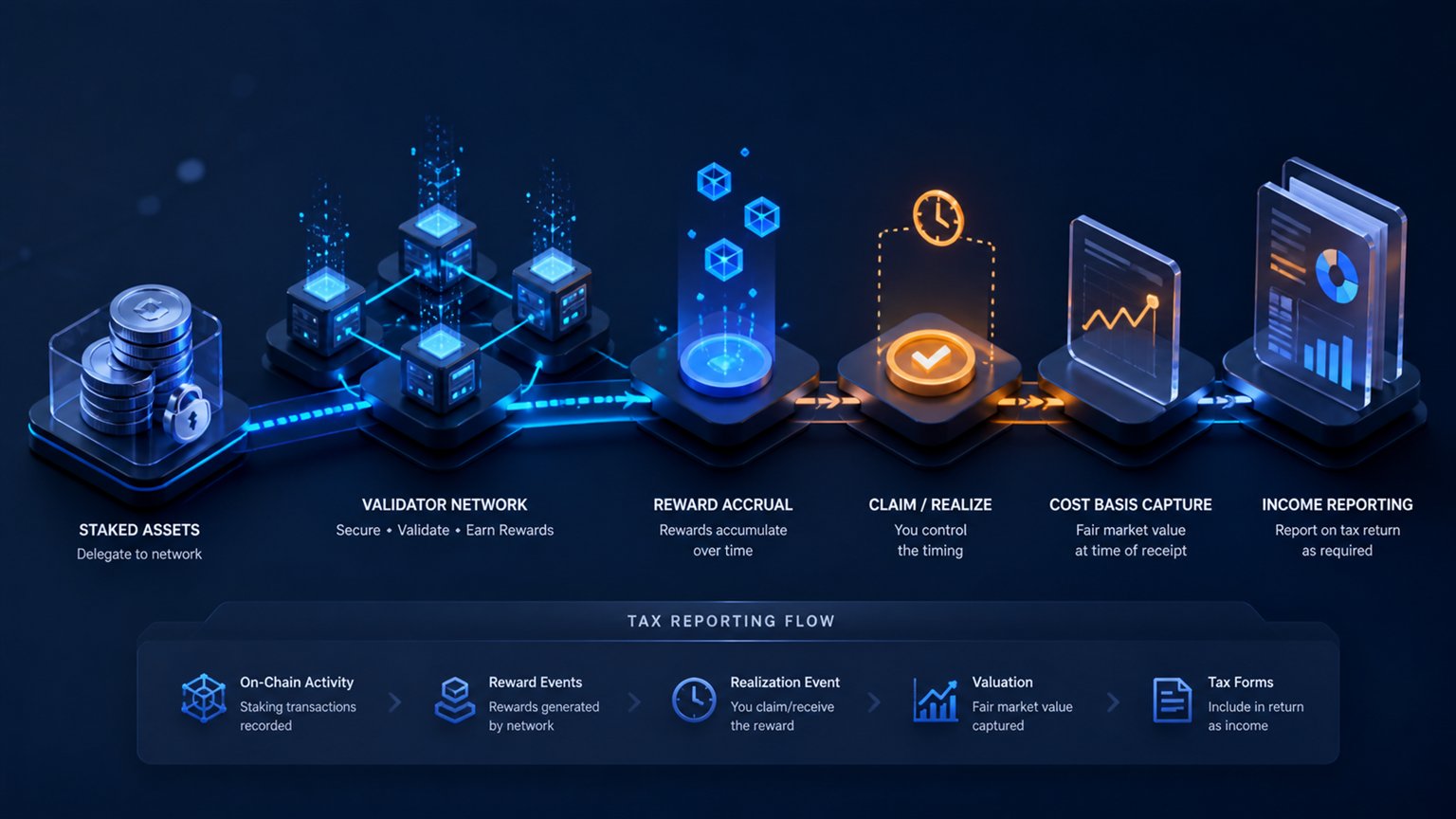
Revenue Ruling 2023-14 states that a cash-method taxpayer includes staking rewards in gross income when the taxpayer gains dominion and control: the practical ability to sell, exchange or otherwise dispose of the reward. Fair market value is measured at that date and time.
For 2025 Kraken says Form 1099-MISC covers at least $600 in specified rewards, including staking, airdrop, deposit and referral rewards. The form aggregates income categories and does not replace a transaction-level ledger. Import every reward so that quantity, timestamp, USD value and subsequent cost basis are preserved.
Example
A user receives 0.02 ETH with a $70 fair market value when it becomes transferable. The user generally recognizes $70 of income and establishes $70 basis in that ETH. If the ETH is later sold for $90, the separate disposition has a $20 gain before transaction costs. Reporting only the later $90 proceeds or only the reward income would be incomplete.
Whether reward income belongs on Schedule 1, Schedule C or another line depends on the taxpayer's facts and activity. A Form 1099-MISC label does not decide whether the activity is a trade or business. See the IRS staking-tax guide for the distinction.
Kraken futures and derivatives are not all taxed alike
The legacy claim that every Kraken Futures result is simply a capital gain is too broad. A qualifying section 1256 contract is generally marked to market at year-end and reported through Form 6781 with the statutory 60% long-term and 40% short-term treatment. But only contracts meeting the section 1256 definition receive that treatment. Other derivatives, spot-margin transactions, swaps or products held through a business can follow different rules.
Use the actual contract, exchange venue, legal entity and year-end statement. Do not infer section 1256 status from a CSV label such as futures or perpetual. For calculation purposes:
- count realized close, settlement, expiration or liquidation results;
- do not count open orders or position snapshots as realized P&L;
- separate fees, funding and interest from trade notional;
- prevent duplicate P&L when both fills and a broker settlement row are imported;
- retain opening information for holding and position documentation even when it is not itself taxable.
IRS Publication 550 describes the section 1256 categories and mark-to-market rules. Complex or high-value derivatives should be reviewed against the product's legal documentation and the taxpayer's trading status.
Create a defensible Kraken tax report
- Download Kraken forms, Tax Center details, Trades, Ledgers, balances and derivatives exports.
- Import the complete acquisition history from every exchange and owned wallet.
- Deduplicate overlapping API and CSV records using Kraken IDs and timestamps.
- Match transfers and carry original basis into Kraken instead of treating deposits as free assets.
- Review missing prices, negative balances, unknown basis and unclassified rewards.
- Apply a unit-identification method supported by timely records.
- Reconcile every 1099-DA sale and the total proceeds.
- Separate capital dispositions, ordinary income and contract-specific derivative results.
- Generate Form 8949/Schedule D workpapers and any applicable income or derivatives schedules.
- Archive the source files, assumptions, corrections and final return support.
CoinTaxReporting supports Kraken API and CSV paths, sale-level Form 8949 workpapers and a TurboTax-compatible crypto workflow. Automation does not authorize invented basis or a guessed derivative classification. Missing values should remain visible review items until supported by evidence.
Common Kraken tax-reporting mistakes
- Reporting Form 1099-DA proceeds as taxable gain.
- Entering zero basis merely because the broker field is blank.
- Downloading Trades but not Ledgers.
- Importing only the tax year and losing older acquisition history.
- Ignoring taxable activity because no Form 1099 was issued.
- Treating the $600 Form 1099-MISC threshold as a tax exemption.
- Using retroactive HIFO without timely specific-identification evidence.
- Classifying every crypto derivative as section 1256.
- Counting open positions or snapshots as realized profit.
- Duplicating activity through overlapping API, Trades and Ledger imports.
Frequently asked questions
Does Kraken send Form 1099-DA to the IRS?
For tax year 2025 and later, Kraken issues Form 1099-DA for eligible reportable activity of covered US clients and sends the reported information to the IRS. Eligibility depends on the account entity, tax residence, recipient status and transactions.
Why is cost basis blank on my 2025 Kraken 1099-DA?
Brokers were not required to report basis for 2025 sales. The taxpayer must calculate basis from complete records. A blank field is not an instruction to use zero.
Will Kraken report basis for 2026 sales?
Basis reporting is required for certain covered digital assets sold after 2025. Pre-2026 acquisitions, transferred-in assets and other noncovered units can still lack mandatory broker basis.
Do I report Kraken activity if I receive no 1099?
Yes, if it is taxable. The IRS requires reporting of digital-asset income, gains and losses whether or not an information form was furnished.
Are transfers from Kraken to my wallet taxable?
A transfer between accounts you own is generally not a sale by itself. Keep evidence of common ownership and preserve the original basis. Paying a transfer fee in crypto can require separate analysis.
Can I use HIFO for Kraken sales after 2025?
Specific identification can be possible, but for broker-custodied units it must satisfy the IRS timing, communication, identifier and record requirements. Without valid identification, the default earliest-acquired rule generally applies within the wallet or account.
Are Kraken staking rewards taxable below $600?
Potentially yes. The $600 amount relates to Kraken's Form 1099-MISC reporting. Income inclusion follows federal tax law and dominion-and-control principles, not whether a form was issued.
Are all Kraken futures section 1256 contracts?
No blanket conclusion is appropriate. Section 1256 treatment depends on the legal contract and venue. Review the product documentation and statement; otherwise keep the result in a review worksheet rather than forcing 60/40 treatment.
Official and technical sources
- IRS: Understanding Form 1099-DA
- IRS: 2026 Instructions for Form 1099-DA
- IRS: Digital assets, records and reporting guidance
- IRS: Digital-asset FAQs and unit-identification rules
- IRS Notice 2014-21: virtual currency as property
- IRS Revenue Ruling 2023-14: staking rewards
- IRS Publication 550: section 1256 contracts
- Kraken: How to read the 2025 combined Form 1099
- Kraken: US tax forms FAQ
- Kraken: Export account history
- Kraken: Differences between Ledgers and Trades
Reviewed September 2, 2026. Tax forms, broker rules and product availability can change. This article provides general educational information and is not individualized tax or legal advice.
Related Resources
Generate Your Crypto Tax Report
Import your transactions, review the results and generate a detailed PDF report with a transaction-level audit trail.
Start for free →Disclaimer: This article is for general informational purposes only and does not constitute tax advice. For individual tax advice, consult a licensed tax professional.