PayPal crypto taxes in 2026: Form 1099-DA, basis and filing
PayPal reports digital-asset disposition proceeds on Form 1099-DA and provides supplemental transaction and gain/loss statements. Those documents still need reconciliation when assets moved in or out of PayPal.
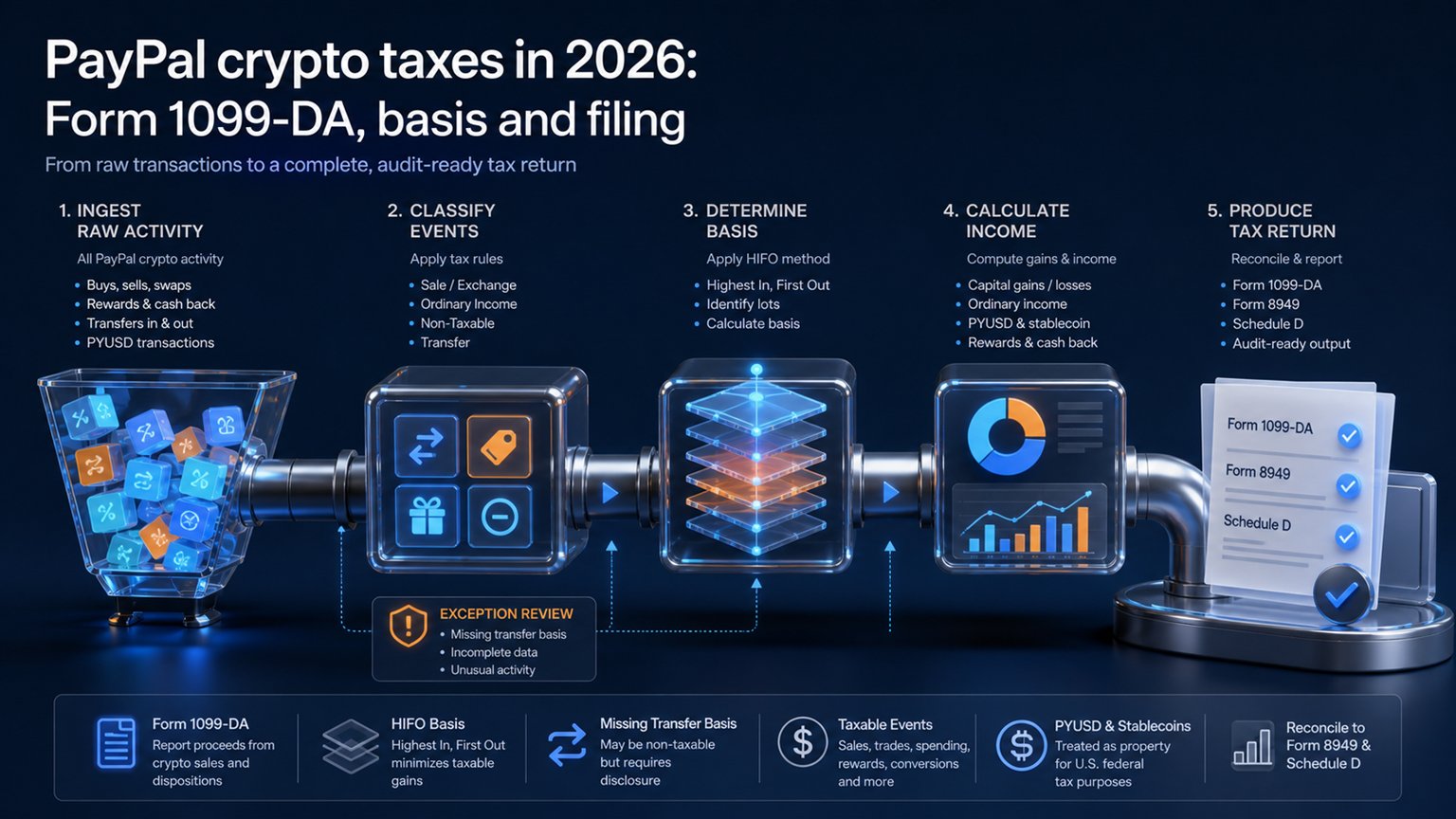
Current position: beginning with tax year 2025, PayPal says it reports proceeds from digital-asset dispositions to the IRS and the customer on Form 1099-DA. For applicable dispositions, the form is provided by February 15. It reports broker information; it does not relieve the taxpayer from calculating correct gain, loss and basis.
Which PayPal crypto tax documents are available?
Prepare Your Crypto Tax Workpapers
Import your transactions, review the results and generate detailed tax workpapers without building the entire calculation manually in spreadsheets.
Start for free →PayPal’s help center lists Form 1099-DA, possible Forms 1099-MISC and 1099-K, a Transaction Summary and a year-end Gain/Loss Statement. Users can access tax forms in the Statements & Tax Center and crypto statements around February 15.
- 1099-DA: disposition proceeds reported to the IRS.
- Gain/Loss Statement: supplemental calculations with basis when available.
- Transaction Summary: transaction-level wallet activity.
- 1099-MISC: certain bonuses, prizes, awards or other reportable payments.
- 1099-K: certain goods-and-services payments, not capital-gain computation.
Different forms can refer to related economic activity. Do not add them mechanically as separate income without reconciling what each reports.
Taxable and non-taxable PayPal events
Selling crypto for dollars, converting one digital asset to another, using crypto at checkout and transferring crypto to another person in exchange for property or services can be taxable disposals. Buying crypto with dollars and merely holding it generally is not a disposition.
A transfer from PayPal to your own self-custody wallet is generally not a sale, but the transaction fee may involve a digital-asset disposition and the basis must follow the units. Sending crypto to another person can instead be a gift, payment or sale depending on facts. The IRS digital-asset question must be answered based on actual activity.
PayPal’s HIFO statement and federal basis rules
PayPal states that its supplemental gain/loss calculation uses highest-in-first-out (HIFO) for assets bought through its crypto hub. This is a convenience calculation, not permission to apply a global HIFO pool across every wallet and exchange.
Federal basis rules require adequate identification and, from 2025, apply basis on a wallet- or account-specific basis under the applicable transition framework. If specific units are not adequately identified, the default ordering rule can apply. The taxpayer should verify that PayPal’s selected lots and records satisfy the tax method actually used.
For an overview of lot identification and capital reporting, see the U.S. crypto capital-gains guide.
Why transferred-in crypto often has missing basis
PayPal’s terms explain that it cannot calculate gains or losses for crypto transferred into the PayPal hub because it does not know the outside acquisition history. A 1099-DA may therefore show proceeds while the supplemental statement has missing or incomplete basis.
- Match the inbound PayPal transfer to the sending wallet transaction.
- Carry over original acquisition date and adjusted basis.
- Allocate network fees consistently.
- Match the later PayPal sale to the correct wallet-specific lot.
- Keep the exchange export and on-chain hash as evidence.
Never replace unknown basis with zero merely to finish the report. Zero may overstate tax and does not resolve the records problem.
Reconciling Form 1099-DA
Compare 1099-DA gross proceeds with the transaction summary, but do not expect proceeds to equal gain. Gain equals proceeds minus adjusted basis and relevant adjustments. Confirm whether each sale is short- or long-term and whether basis was reported to the IRS.
Starting with sales after 2025, broker basis reporting expands for covered digital assets under the Form 1099-DA rules. Assets transferred into PayPal may remain noncovered or lack broker-known basis. The Form 1099-DA guide explains covered versus noncovered reporting.
Form 8949 and Schedule D
Capital sales are generally reported on Form 8949 unless an exception in the instructions permits direct Schedule D aggregation. Form 8949 separates categories based on holding period and whether basis was reported. Schedule D summarizes capital gains, losses and carryovers.
A broker statement does not file Form 8949 for the taxpayer. PayPal explicitly says taxpayers prepare that form. Ordinary income such as a reportable reward follows the applicable income schedule and should not be duplicated as capital proceeds. See the broader U.S. reporting workflow.
PYUSD, rewards and checkout
PYUSD is a digital asset for federal tax reporting. A sale or exchange can be reportable even when economic gain is small. PayPal terms also identify PYUSD rewards as potentially taxable. The dollar value at receipt can be income and establish basis; later disposition is separate.
Checkout with Crypto generally involves selling crypto to fund the purchase. Record the digital-asset disposition and the purchase separately. A PayPal receipt for goods does not replace the crypto lot history.
PayPal and Venmo must be reconciled, not assumed identical
PayPal and Venmo activity may appear in separate statements or accounts. Transfers between them can move basis without creating a sale when ownership remains the same. Download all available statements and match transfers before calculating disposals.
Do not assume that two forms always arrive or that every Venmo feature follows the exact same export path. Use the documents actually furnished for the taxpayer and tax year.
PayPal crypto filing checklist
- download Form 1099-DA and supplemental crypto statements;
- import complete PayPal and Venmo histories;
- match every transfer-in to outside basis;
- verify HIFO selections against the method used on the return;
- reconcile proceeds, not gain, to Form 1099-DA;
- separate rewards and business payments from capital disposals;
- flag unsupported basis as missing, never silently zero.
The tax-data quality checklist provides the final review steps.
Frequently asked questions
Does PayPal send Form 1099-DA?
Yes. PayPal says disposition proceeds have been reported beginning with tax year 2025, with applicable forms furnished by February 15.
Does 1099-DA show taxable profit?
No. It reports broker data such as proceeds. Gain or loss still requires adjusted basis and transaction-level reconciliation.
Can I automatically use PayPal HIFO on my return?
PayPal uses HIFO in its supplemental statement when available, but the taxpayer must satisfy federal identification and wallet/account-specific rules.
Why is basis missing after a transfer?
PayPal did not observe the outside acquisition. You must carry basis and acquisition date from the sending wallet or exchange.
Is Checkout with Crypto taxable?
Generally yes, because crypto is sold or otherwise disposed of to fund the purchase.
Do I report a gain without receiving a form?
Yes. The IRS requires taxable digital-asset activity to be reported regardless of whether a payee statement arrives.
Official sources
- PayPal: crypto tax forms, statements and Form 1099-DA timing
- PayPal: Cryptocurrency Terms, HIFO and transferred basis
- IRS: Digital assets and federal reporting
- IRS: 2026 Instructions for Form 1099-DA
Reviewed 2 September 2026 against current PayPal and IRS materials. This article is general federal tax information.
Related Resources
Generate Your Crypto Tax Report
Import your transactions, review the results and generate a detailed PDF report with a transaction-level audit trail.
Start for free →Disclaimer: This article is for general informational purposes only and does not constitute tax advice. For individual tax advice, consult a licensed tax professional.