Phantom Wallet Tax Reporting: Solana, Staking and DeFi
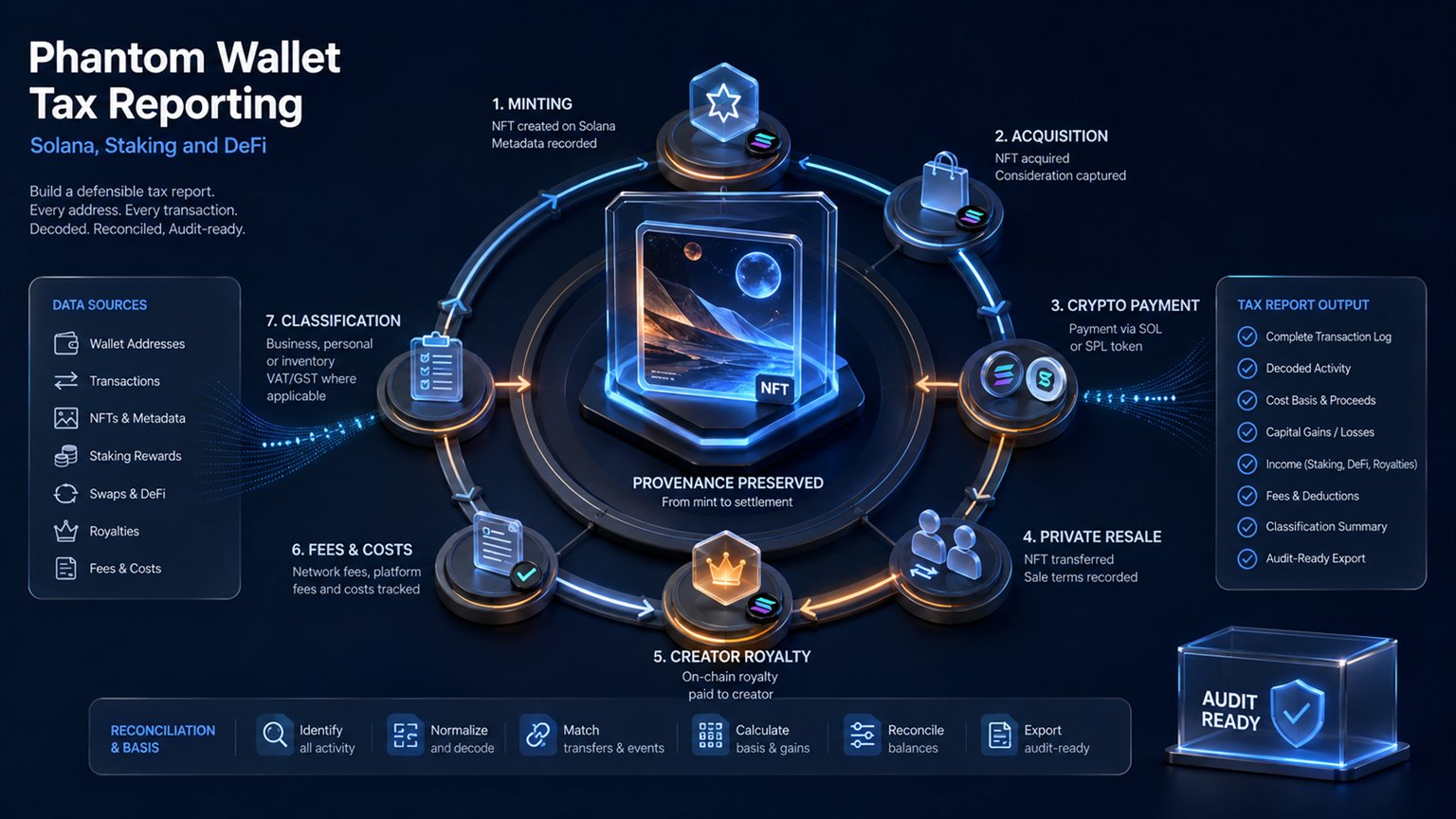
Phantom is a self-custody wallet, not a tax ledger or exchange. It does not issue a complete Form 1099 or determine whether a swap, stake account, NFT or DeFi position is taxable. A reliable report starts with every public address, restores activity from explorers, groups Solana instructions into economic transactions and reconciles the result with exchanges and cost-basis records.
Does Phantom provide a tax report?
Prepare Your Crypto Tax Workpapers
Import your transactions, review the results and generate detailed tax workpapers without building the entire calculation manually in spreadsheets.
Start for free →Phantom's tax help page states that Phantom is a self-custody wallet, does not hold the user's funds and does not issue tax forms such as Forms 1099. The app's History and P&L views can be useful for review, but they are not a complete tax calculation. Phantom also says its Solana P&L feature is not intended for tax purposes and is calculated per account rather than across all accounts.
This distinction matters. Blockchain history proves that instructions occurred; it does not by itself identify the taxpayer, establish transferred-in basis, decide beneficial ownership or classify the economic purpose. A tax report must combine onchain evidence with exchange exports, wallet ownership, fair-market values and protocol context.
| Source | Useful information | Common gap |
|---|---|---|
| Phantom History | Recent sends, receives, swaps, staking and product activity | May filter spam or omit older detail |
| Blockchain explorer | Signatures, block time, instructions, token transfers and fees | No complete tax classification or offchain basis |
| Exchange CSV/API | Fiat trades, deposits, withdrawals and broker records | Self-custody and protocol activity may be absent |
| Tax engine | Grouping, basis matching, valuation and forms | Output is only as reliable as imported and decoded data |
How to export Phantom wallet activity
Start by listing every account and network used. Phantom explains that a wallet can contain multiple accounts and that each account has its own address. Repeat the export for every relevant address. Public addresses are enough for an explorer or tax importer; never share a Secret Recovery Phrase or private key.
- Open Phantom and copy the receive address for each account and network.
- Record which taxpayer and purpose belongs to each address.
- Use the network's explorer to retrieve the complete address history.
- For Solana, review transactions, token transfers, stake accounts and rewards, not only the basic Transfers CSV.
- Save transaction signatures, timestamps, token mint addresses, raw quantities and fees.
- Import centralised exchanges, other wallets and fiat records covering the same period.
- Preserve the raw files before making manual classifications.
Phantom notes that explorers differ: some exports contain only transfers while others include contract interactions. A Transfers CSV can therefore be incomplete for swaps, staking, liquidity pools, NFTs, token-account rent and complex programs. The full address history is the control population.
One Solana transaction is not one taxable line per instruction
A Solana swap can create many instructions: compute-budget settings, associated token-account creation, wrapped SOL, approvals, transfers, program calls, priority fees and account closure. Taxing every instruction separately creates artificial income, duplicate disposals and negative balances. The instructions must be grouped into the economic event represented by the signature.
For each signature, identify what the taxpayer surrendered, what was received, which units paid fees, and whether ownership changed. Token symbols are not reliable identifiers; use the mint address. A spam token with a copied name must not contaminate lots for the genuine asset.
- Match temporary wrapped SOL deposits and withdrawals within the same transaction.
- Connect associated token-account rent deposits with later rent refunds.
- Separate failed transactions and fees from completed swaps.
- Distinguish transfers between owned addresses from gifts or payments.
- Identify protocol receipt tokens, LP positions and liquid-staking tokens.
- Keep unsupported or unpriced instructions in a review queue rather than assigning zero value.
The technical mechanics are explained further in our Solana tax guide.
Common U.S. tax events in a Phantom wallet
For U.S. federal tax purposes, the IRS treats digital assets as property. Buying with dollars and holding generally does not realise gain. Selling, swapping, spending or otherwise disposing of a digital asset can produce gain or loss. Receiving tokens for services, rewards or other income can create ordinary income and a new basis.
| Wallet activity | Typical review | Required evidence |
|---|---|---|
| Own-wallet transfer | Generally not a disposal; fee treatment remains | Control of both addresses and carried basis |
| SOL-to-token swap | Disposition of SOL and acquisition of token | Units, USD value, fees and signature |
| NFT purchase with SOL | SOL disposition plus NFT acquisition | SOL basis, NFT value and marketplace fee |
| Reward received | Potential ordinary or business income | Dominion-and-control time and USD value |
| Spam token appears | Do not invent income; assess control and value | Mint, restrictions and actual market |
| Perpetual position closes | Separate contract P&L and funding review | Product terms, opening, closing and settlements |
An own-wallet transfer should carry the original acquisition date and basis. The IRS digital-asset FAQs state that a transfer between wallets, addresses or accounts owned by the same taxpayer is not itself taxable, although digital assets used to pay the transfer fee can be disposed of. Missing ownership evidence is a data-quality issue, not permission to record a sale.
Native SOL staking and liquid staking
Native SOL delegation uses stake accounts and epoch rewards. Creating or managing a stake account should be separated from the rewards credited to it. Revenue Ruling 2023-14 says a cash-method taxpayer generally includes proof-of-stake rewards at fair market value when dominion and control is obtained. A later sale of the reward units creates a separate gain or loss using the income value as basis.
Phantom's help centre directs users to stake-account history and allows reward history to be reviewed by epoch through an explorer. Import every stake-account address, because the main wallet history alone may not contain a usable reward ledger.
Liquid staking is different from native delegation. Exchanging SOL for mSOL, JitoSOL or another protocol token can involve materially different property and rights. There is no universal IRS ruling that every liquid-staking deposit is tax-free. Record the units surrendered, token received, exchange value, redemption mechanics and any separate rewards. See the IRS staking tax guide for the income-timing rule and unresolved protocol questions.
DeFi, bridges, NFTs, airdrops and Phantom products
A DeFi label does not settle tax treatment. A liquidity deposit can exchange tokens for an LP token or position NFT; a withdrawal can return different assets. Lending may issue a receipt token, while borrowing can create collateral and liquidation events. Record contributed assets, received rights, accrued fees, debt changes and returned assets.
Bridges need both sides. A movement of the same beneficially owned asset through a bridge may be an internal transfer, while a wrap, mint or exchange into materially different property can require additional analysis. Never treat an unmatched bridge withdrawal as free income or an unmatched deposit as a deductible loss.
NFT purchases, sales and creator royalties have different legs. An NFT purchase with SOL disposes of SOL; the NFT receives a cost basis. A creator's primary-sale proceeds and royalties can be ordinary business income. Airdrops and unsolicited tokens require dominion, control and value analysis rather than an automatic zero or income label.
Phantom now displays activity for multiple products, including swaps, staking, prediction markets and perpetuals. Product history is evidence, not a federal tax classification. Perpetual settlements, funding and collateral movements should be kept separate from spot Form 8949 lots until the contract and taxpayer treatment are confirmed. The U.S. DeFi tax guide explains the evidence-first approach.
A defensible Phantom tax-report workflow
- Inventory every Phantom account, stake account, exchange and connected wallet.
- Download raw history and retain signatures and mint addresses.
- Decode signatures into economic events without duplicating instructions.
- Connect all owned-wallet transfers and carry their basis and holding period.
- Reconstruct missing acquisition history from exchange withdrawals and prior wallets.
- Value income and disposals in U.S. dollars at supportable timestamps.
- Separate capital disposals, income, business activity, derivatives and unresolved items.
- Reconcile year-end quantities to onchain balances and explain differences.
- Compare broker Forms 1099-DA with detailed transactions; do not replace missing basis with zero.
- Keep the evidence described in the crypto tax record checklist.
Frequently asked questions
Does Phantom send a Form 1099?
Phantom states that it is a self-custody wallet and does not issue tax forms such as Forms 1099. A separate in-app provider or exchange may have its own reporting obligations.
Can Phantom History be used as the complete tax report?
No. It is useful supporting evidence, but older, filtered, complex or offchain activity and transferred-in basis can require explorers and other records.
Is a Phantom-to-exchange transfer taxable?
Generally not when the same taxpayer owns both accounts, but ownership, basis, acquisition date and transfer fees must be documented.
Are native SOL staking rewards taxable?
For a cash-method U.S. taxpayer, proof-of-stake rewards generally enter income when the taxpayer obtains dominion and control, valued at that date and time.
Is swapping SOL for a liquid-staking token tax-free?
Do not assume so. The separate token and protocol rights require a facts-and-circumstances analysis.
Are every instruction and token transfer separate tax events?
No. Group instructions by transaction signature and economic event. Otherwise one swap can be counted multiple times.
Should I share my recovery phrase with tax software?
Never. A tax importer needs public addresses or read-only records, not a recovery phrase or private key.
Official and primary sources
- Phantom: export transaction history for taxes
- Phantom: view wallet history on a blockchain explorer
- Phantom: track native SOL staking rewards
- IRS: digital assets and reporting
- IRS Revenue Ruling 2023-14: staking rewards
- IRS: digital-asset transaction FAQs
Sources reviewed 2 September 2026. This guide covers common U.S. federal reporting issues; state and non-U.S. rules differ.
Related Resources
Generate Your Crypto Tax Report
Import your transactions, review the results and generate a detailed PDF report with a transaction-level audit trail.
Start for free →Disclaimer: This article is for general informational purposes only and does not constitute tax advice. For individual tax advice, consult a licensed tax professional.